When checking their IP address via command line on a computer, many users see numbers starting with 192.168.1.x or 192.168.0.x; yet when they open a "My IP" web page, a completely different set of numbers appears on screen (such as 114.32.x.x or 220.135.x.x). What exactly is the difference between these two IP addresses?
1. What Is a Public IP (External IP)?
A public IP is the "globally unique street address" assigned by your Internet Service Provider (ISP, such as Chunghwa Telecom HiNet, Kbro, Far EasTone, Taiwan Mobile, etc.) to your home modem or mobile phone.
se1.me/en/my-ip, the system detects and displays your current external public IP in real time.2. What Is a Private IP (Local Network / LAN IP)?
At home or in the office, several phones, laptops, and tablets usually connect to the same Wi-Fi router at the same time. So that these devices can identify one another on the internal network, the router automatically assigns "internal extension numbers" via DHCP—these are private IPs.
According to international standards (RFC 1918), three private IP address blocks are reserved globally for internal networks:
| Class | Subnet Range | Common Scenarios |
|---|---|---|
| Class A Private Network | 10. – 10. | Large enterprises or carrier-grade internal networks |
| Class B Private Network | 172. – 172. | Medium businesses or virtual container networks |
| Class C Private Network | 192. – 192. | Home Wi-Fi routers (e.g., 192.) |
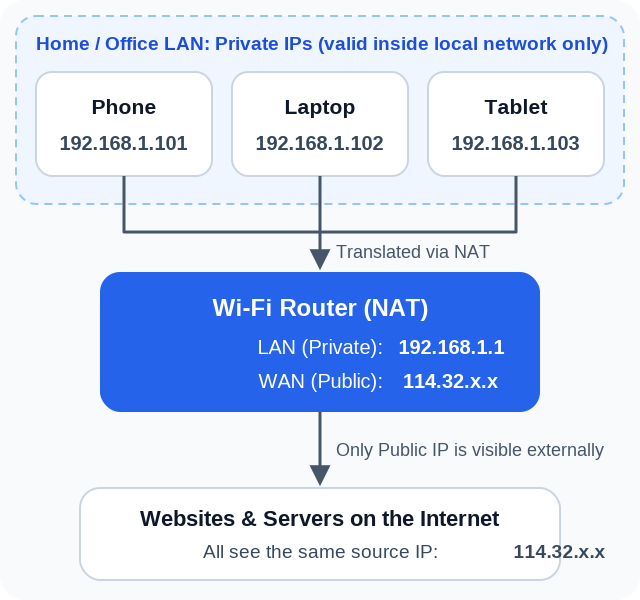
Private IPs cannot be reached directly from the outside internet; traffic must pass through the router's NAT (Network Address Translation) to access the internet collectively under a single shared "public IP." The diagram below illustrates how multiple devices in the same home share one public IP:
3. Why Do IPv4 and IPv6 Coexist?
| Item | IPv4 (Version 4) | IPv6 (Version 6) |
|---|---|---|
| Format | 4 groups of decimal numbers from 0~255 | 8 groups of hexadecimal characters |
| Example | 203. | 2001:b000:168::1 |
| Total Addresses | About 4.29 billion (2 to the 32nd power) | About 3.4 × 10 to the 38th power (2 to the 128th power) |
| Current Status | Address space is exhausted; relies on NAT so multiple devices can share one public IP | Abundant addresses; every device can have its own independent external address |
Both protocols currently operate side by side. Many ISPs and mobile networks provide both simultaneously (Dual-Stack), so your device may hold both an IPv4 and an IPv6 address at the same time.
4. How to Distinguish Between a Static IP and a Dynamic IP?
| Item | Dynamic IP | Static IP |
|---|---|---|
| When It Changes | After rebooting your modem, reconnecting PPPoE, or toggling Airplane Mode on your phone, your ISP may assign a new public IP | Remains permanently fixed after applying with your ISP and does not change after reboots |
| Best Used For | Everyday web browsing | Hosting websites, remote NAS access, corporate firewall IP whitelisting, and Remote Desktop connections |