URL Security & Anti-Phishing
Updated: 60 views

Afraid to Click an Unknown Short Link? 3 Safe Steps to Unshorten the Target URL, Inspect the Redirect Chain, and Check the Server IP

SMS messages and chat apps are full of unknown short URLs disguised as parcel delivery notices, overdue bills, or prize giveaways. Learn how to safely reveal the true final destination URL and server location behind a short link without triggering browser redirects.

Short URLs make long web addresses neat and easy to share, but cybercriminals also frequently abuse them to disguise phishing sites or malware downloads. When you receive an unfamiliar short link via SMS, LINE, or social media messages, never click it directly! You can safely inspect it beforehand by following these 3 steps:

Step 1: Use the "URL Checker" to Reveal the True Destination Without Triggering Your Browser

Copy and paste the suspicious link into our "URL Checker (se1.me/en/check)" tool. The system traces the redirection path on your behalf, listing intermediate redirect hops (showing up to the first 3 hops, with any remaining hops condensed as "...") along with the "Final Destination URL (Final URL)" so you can clearly inspect the real domain name before ever opening the page.
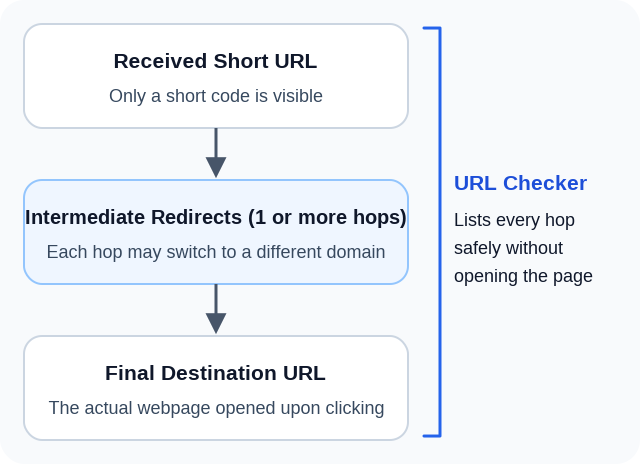
Diagram: A short URL may pass through one or multiple redirect hops before reaching the final URL, and the URL Checker lists each step
See every hop a short link takes before you ever open the web page

Step 2: Verify Whether the Destination Domain Is the Official Legitimate Domain

Many scam pages rely on look-alike characters (such as disguising the number 0 as the letter o, or tacking on unrelated free top-level domains like .top, .xyz, or .vip):

• Official Taiwan government agency websites typically end with .gov.tw (or .gov in the United States).
• Major banks, telecom carriers, and delivery companies all operate under fixed primary domains and will never ask you to enter credit card numbers, online banking passwords, or SMS OTP verification codes on a random gibberish domain.

Step 3: Check the Target Website’s Domain Registration Age and Server IP

The same "URL Checker" report also lists domain registration details and hosting server information for the destination website. Pay close attention to two extra details:

• Domain Registration Info (WHOIS): Check the "domain registration age." If a website claims to represent a well-known brand but its domain was registered only a few days or weeks ago, the risk is extremely high—never enter personal data or payment details on that page.
• Server & Hosting Info: Review the "Country & City," "Server IP," "Internet Service Provider (ISP)," and "Autonomous System (ASN)" to see whether the server's location clearly contradicts the business the website claims to run. To investigate an IP further, paste the server IP from the report into our "IP Lookup (se1.me/en/search-ip-info)" tool to inspect its carrier, ASN, and RDAP subnet registration records.
• Once you confirm a short link is malicious, you can submit it through our "Report Malicious Short URL (se1.me/en/report)" page to help block and intercept it.

Further Reading & Related Guides